CCTV SD1 Workflow
- The one-stage classification modelling approach develops a multi-label classification model trained on the full training data set to classify the types of defects present in the defective images and to identify non-defective images.
- This is a binary classification model trained on the full training data set to distinguish defective images from non-defective images.
- The two-stage classification modelling approach develops two classification models.
- This is a multi-label classification model trained only on the data for defective images to classify the types of defects present in the images
Introduction
Overall Goal
Get an end to end pipeline working where we can receive videos from a new Utility and we can generate the required CSV files as output, showing where the defects in the videos are.
Critical questions to be answered:
- Consider using multiple frames table(based on video group) as opposed to a single frames table.
- Understanding cctv_SD1_label_images.ipynb
Path forward
- This document explains the workflow of CCTV project, from data gathering & processing to training, followed by questions.
- Make sure to follow the steps in the README for gqc-utility-notebooks in order to run the scripts mentioned later in the documentation.danger
The documentation for CCTV is generated using
nbdevand is available here. The link can also be found in theaboutsection of thegqc-utility-notebooksrepository. Link does not work. And link in gqc utility notebooks takes us to gqc utility notebooks.
- If any portion of the processing requires running a notebook from
gqc-utility-notebooksas a notebook itself, make a copy of it underUTLITIY/Data/Dataset/Notebooksfolder before modifying.
- The latest workflow uses DB tables instead of CSV files.
- The workflow example in this document uses a subset of the SD1D uploaded on May 26 2023 called
UTILITY_X.
When running the processing on larger datasets, the runtime can be really long. In order to run a longer process without getting disconnected from the machine use tmux instead of VPN or MSI for more infomation on tmux https://tmuxcheatsheet.com/
  Open a tmux session with "tmux".
  We can start the long-running task on the MSI.
  Then press "Ctrl + b d" to detach from the session.
  You can then close the window.
  You can reattach to the session with "tmux a".
Current Workflow
Gold standard ERD with foreign key relations (Video_DB_UTL_X.db is the only database currently that complies with this)
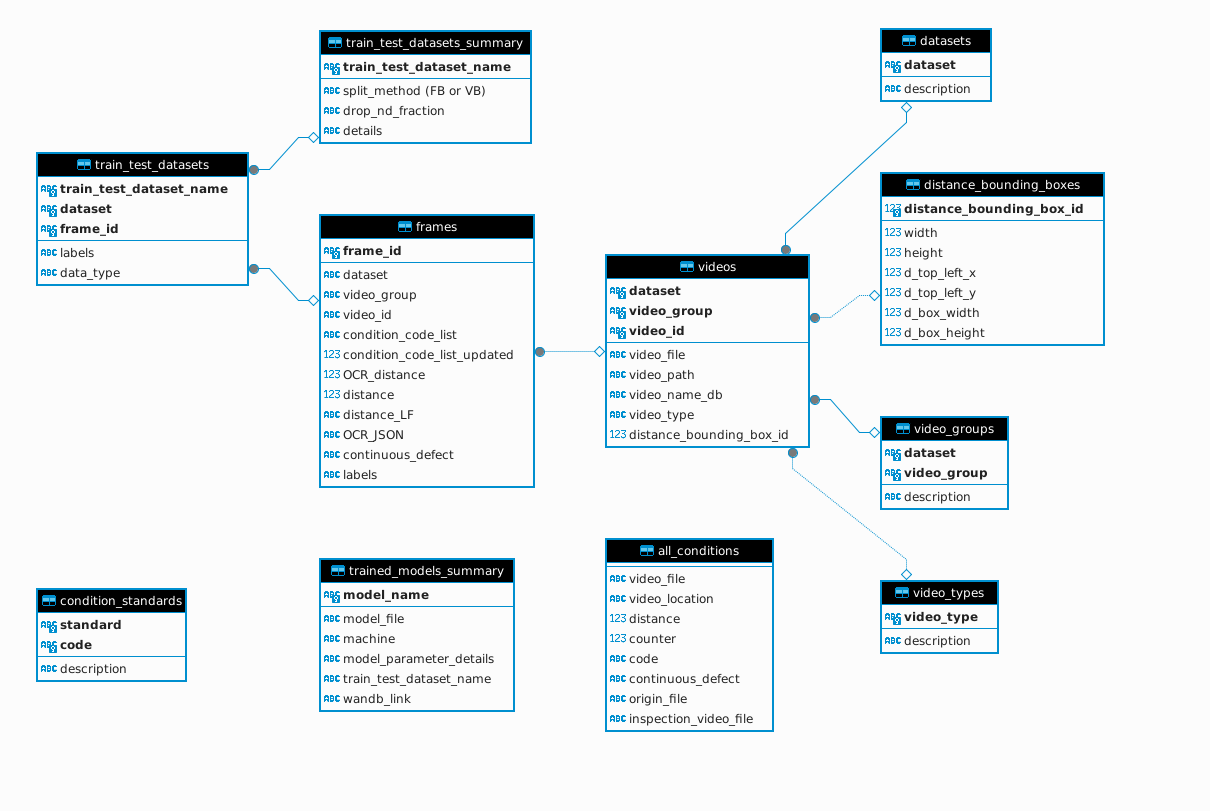
Current ERD for SD1 Video DBs
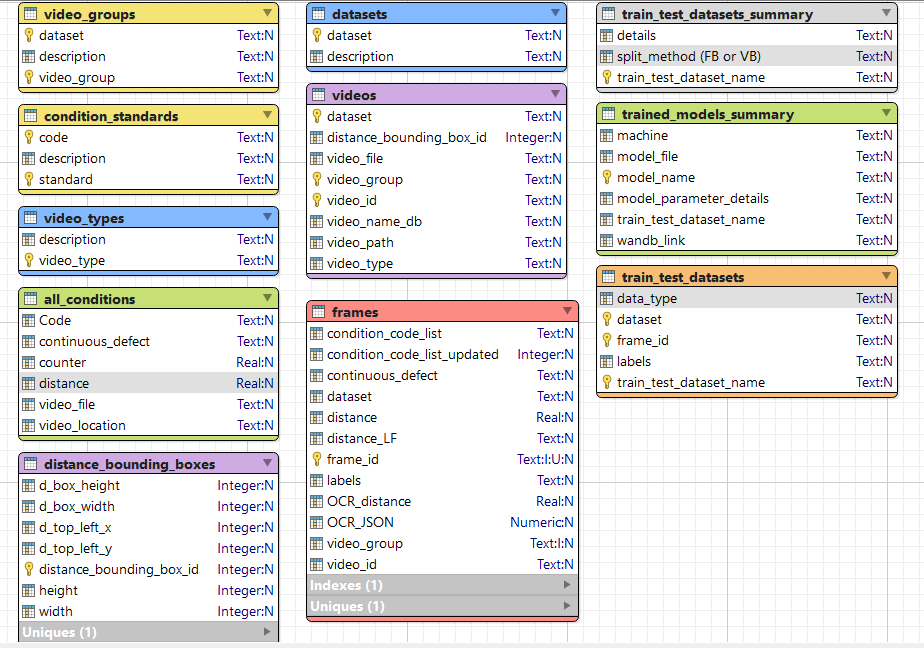
Old ERD
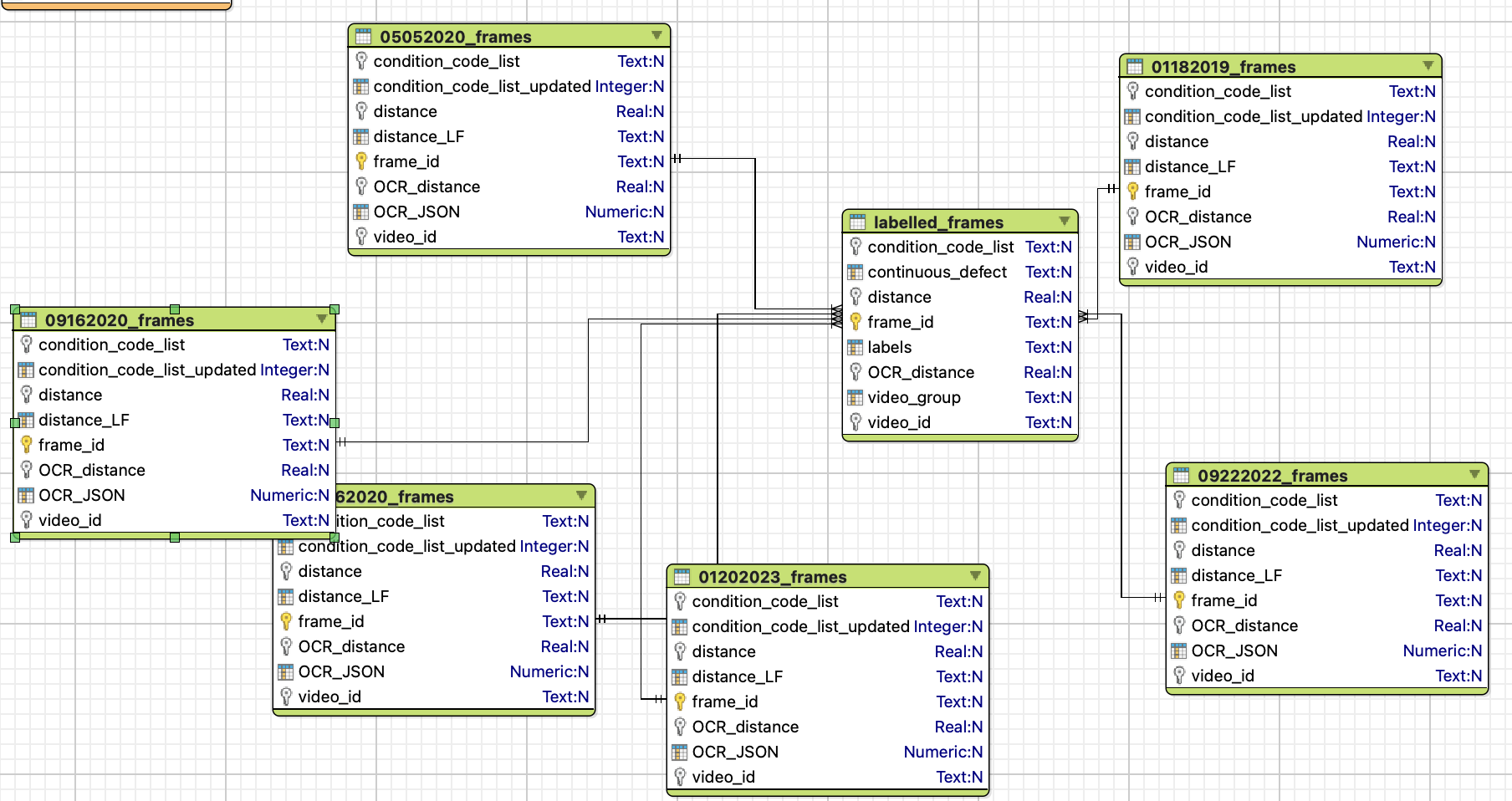
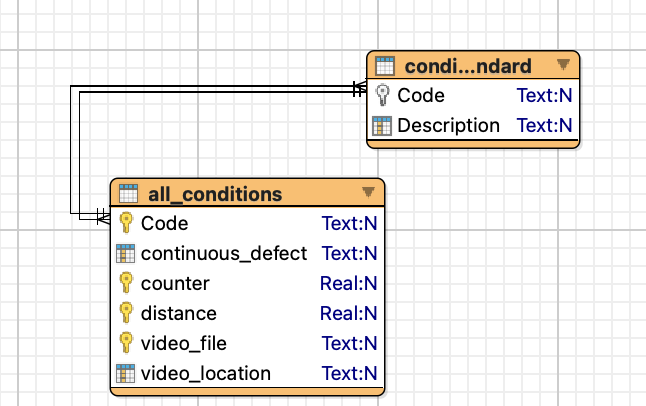
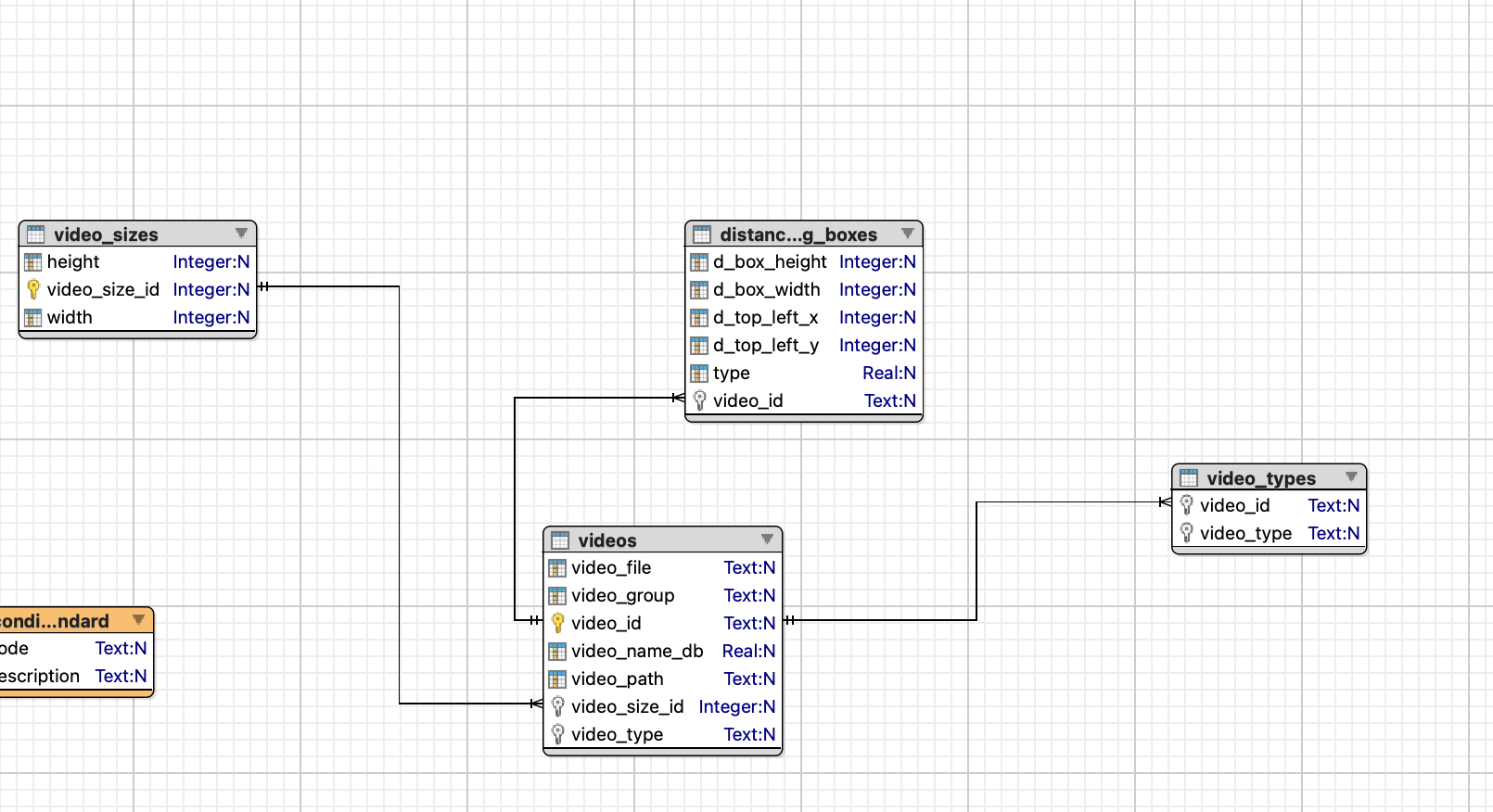
Definitions of Tables and Column
cctv_sd1_pavan.db and Video_DB_SD1.db were the same database but they have been refactored. The database that is currently being used is Video_DB_SD1.db, do not use cctv_sd1_pavan.db.
Rows that are present in the videos table of cctv_sd1_pavan.db/videos:
- distance_bounding_box_id: An id assigned to a video which is related to the distance_bounding_box table (foreign key to the distance_bounding_box table).
- dataset: Corresponds to the dataset within the Data folder from which the videos are pulled from.
Important point: conditions are the same as defects.
Rows that are present in cctv_sd1_pavan.db:
- standard: Refers to the inspection standard with which the pipe was inspected.
This table serves as a definition for the video_types column in the videos table.
The distance bounding box CSV contains information of the bounding box that encloses the distance annotation in the video.
Rows present in Video_DB_SD1.db/distance_bounding_boxes:
- video_id: Same as the video_id in the videos table.
- type: Not entirely sure but all values of this are null.
Rows present in cctv_sd1_pavan.db/distance_bounding_boxes:
- distance_bounding_box_id: Primary key of the table that is used as a link between the videos table and the distance_bounding_box table.
- width: Refers to the with of the video (need to double check).
- height: Refers to the height of the video
The frames table is created after frame extraction from the videos and contains information about the frames extracted.
Not entirely sure what this is, but it refers to some of the defect codes that were present in the condition_standards table.
Present only in cctv_sd1_pavan.db
The video_groups table is a reference table for which dataset each video group belongs to. There is a description column present, but all the rows in the column are NULL. A video group is an arbitrary name given to a collection of videos sent to gqc by the utility.
labelled_frames table (Present only in Video_DB_SD1.db)
The columns present in this table are similar to those present in the frames table of the newer cctv_sd1 database. The columns in this table are:
- video_id: This is similar to the video_id in the videos table (point 1)
- frame_id: This column is similar to the frame_id in the frames table and is also a primary key.
- labels: Similar to the frames table.
- video_group, condition_code_list, OCR_distance, distance, and continuous defect are all the same as the frames table. The labelled frames table has more data present in it than the frames table.
'<video_group>_frames table' it is (present in Video_DB_SD1). The columns are similar to what is present in the frames table.
Only within cctv_sd1_pavan.db tables all are empty
- videos table
The videos table contains is populated using the videos that are received from a Utility. It contains the following columns:
- video_group: Corresponds to the name of the subfolder within the Received_Data folder from which the Video is pulled.
- video_id: This is the id assigned to the video. The video_id is used as a cross-reference for the video_file column since video_file may have been named incorrectly at times.
- video_file: This is the actual file name of the video with the extension.
- video_path: The directory path in which the video_file is stored. (Needs renaming to folder_path and columns needs refactoring to only have the location of the folder in which the file is stored)
- video_name_db: Might have been used to refer to the specific database where the video is stored, but currently contains data which is all not_defined.
- video_type: Videos are assigned a type based on where the distance field is located in the video as well as how the distance field is formatted in the video.
- video_size_id: A foreign key to the video_sizes table which is used to identify the width and height of the video. Rows that are present in the videos table of cctv_sd1_pavan.db/videos:
- distance_bounding_box_id: An id assigned to a video which is related to the distance_bounding_box table (foreign key to the distance_bounding_box table).
- dataset: Corresponds to the dataset within the Data folder from which the videos are pulled from.
- all_conditions table Important point: conditions are the same as defects. The all_conditions table contains information about the defects for a specific video. It contains the following columns:
- Code: This corresponds to the Defect code that the pipe in the video has. The meaning of the code can be found out from the condition_standards table in the description column.
- continuous_defect: These are the defects that occur continuously over the length of the pipe and every frame of the video is documented as having this defect.
- counter: Need to check what this is. Sample data: integer values.
- distance: Distance relative to the start of the inspection.
- video_file: The actual file name of the video with the extension.
- video_location: Might refer to the location where the utility stored the video. Sample data present in the column: Video\, Video\SD1_0420070-0420069_322020-1530_D_34943\, Y:\Work Order #11-025565 Complete\
- condition_standards table Serves as a definition table for the conditions(defects).
- Code: This is the defect code.
- Description: This column describes what the defect code actually means. Rows that are present in cctv_sd1_pavan.db:
- standard: Refers to the inspection standard with which the pipe was inspected.
- video_types table This table serves as a definition for the video_types column in the videos table.
- video_type: Videos are assigned a type based on where the distance field is located in the video as well as how the distance field is formatted in the video.
- distance_field_regex: The regex expression that is used to query out the distance.
- d_top_left_x: The x coordinate of the top left corner of the distance box finder.
- d_top_left_y: The y coordinate of the top left corner of the distance box finder.
- d_bottom_right_x: The x coordinate of the bottom right corner of the distance box finder.
- d_bottom_right_y: The y coordinate of the bottom right corner of the distance box finder.
- distance_bounding_boxes table The distance bounding box CSV contains information of the bounding box that encloses the distance annotation in the video.
- d_top_left_x: The x coordinate of the top left corner of the bounding box.
- d_top_left_y: The y coordinate of the top left corner of the bounding box.
- d_box_width: The width of the bounding box.
- d_box_height: The height of the bounding box. Rows present in Video_DB_SD1.db/distance_bounding_boxes:
- video_id: Same as the video_id in the videos table.
- type: Not entirely sure but all values of this are null. Rows present in cctv_sd1_pavan.db/distance_bounding_boxes:
- distance_bounding_box_id: Primary key of the table that is used as a link between the videos table and the distance_bounding_box table.
- width: Refers to the with of the video (need to double check).
- height: Refers to the height of the video
- frames table (present in cctv_sd1_pavan.db) The frames table is created after frame extraction from the videos and contains information about the frames extracted.
- dataset, video_group, and video_id all refer to the same things mentioned in the video table.
- condition_code_list: Not entirely sure what this is, but it refers to some of the defect codes that were present in the condition_standards table.
- condition_code_list_updated: Seems to be a boolean value and is set to 1 wherever condition_code_list is specified and 0 wherever condition_code_list is not specified.
- continuous_defect: refers to the same thing mentioned in the all_conditions table.
- distance: The actual distance relative to the start of the inspection.
- distance_LF: Not entirely sure, but all the rows in this column are null.
- frame_id: A unique id that is assigned to each frame in the table (primary key of the table).
- labels: The label for a frame whether the pipe in the frame has a defect or not. ND stands for non-defective.
- OCR distance: The distance value that Azure OCR produces as an output. Values in thie column aren't always the same as the distance column.
- OCR_JSON: This column contains JSON strings(need to check what it is exactly).
- video_groups table (Present only in cctv_sd1_pavan.db) The video_groups table is a reference table for which dataset each video group belongs to. There is a description column present, but all the rows in the column are NULL. A video group is an arbitrary name given to a collection of videos sent to gqc by the utility.
- labelled_frames table (Present only in Video_DB_SD1.db) The columns present in this table are similar to those present in the frames table of the newer cctv_sd1 database. The columns in this table are:
- video_id: This is similar to the video_id in the videos table (point 1)
- frame_id: This column is similar to the frame_id in the frames table and is also a primary key.
- labels: Similar to the frames table.
- video_group, condition_code_list, OCR_distance, distance, and continuous defect are all the same as the frames table. The labelled frames table has more data present in it than the frames table.
- <video_group>_frames table (present in Video_DB_SD1): These table contains the following columns: video_id, frame_id, condition_code_list, OCR_distance, distance_LF, OCR_JSON, and condition_code_list_updated. The columns are similar to what is present in the frames table.
- trained_models_summary, train_test_datasets, train_test_datasets_summary (within cctv_sd1_pavan.db) tables all are empty
Distance Bounding Box and Video Type
The video_type of a video serves multiple purposes, including defining search rectangles to identify distance values and condition codes within the video's frames. Additionally, the video_type specifies regex expressions used to extract these distance values and condition codes. For certain video_types (or if the video_type is not specified), the distance_bounding_box table is used instead to define the search rectangle for distance values.
Dataflow diagram
CCTVpackage is here. Generate the documentation following the instructions in theREADMEfile on the package to see more details on how to run each of the following stages. The workflow below is specifically for the Video_DB_SD1 database, but applies to the other gqc created databases as well. File locations mentioned are specific to the MSI server.1. Notebook 1: Video List creation and update (02_cctv_cv/cctv-video_list-creator.ipynb)
2. Notebook 2: Extracting metadata from metadata DBs (02_cctv_cv/metadata_DB_extract_inspection_condition_data.ipynb)
This module will only work on Windows as it requires reading from Access DBs which is only supported under windows.
Creation of all_conditions.csv from Access Databases
3. Notebook 3: Import supplementary data (02_cctv_cv/cctv-import_supplementary_data.ipynb)
The locations of the CSV files used below are specified in the cctv_settings.yml
Supplementary data tables should be added by now?
4. Notebook 4: Frame Extraction: Locations of the video files is received from the videos table, after which frame extraction takes place. Frame extraction is done using openCV. (02_cctv_cv/cctv-frame-extraction.ipynb)
5. Notebook 5: Stitch frames and run through Azure OCR (02_cctv_cv/cctv-full-frame-stitch-and-Azure-OCR.ipynb)
6. Notebook 6: Blurring frames (02_cctv_cv/cctv-save-blurred-frames.ipynb)
7. Notebook 7: Extracting distance values from Frames (02_cctv_cv/cctv-extract-distance-values.ipynb)
8. Notebook 8: Distance Value Post Processing Logic (02_cctv_cv/cctv-distance-value-post-processing.ipynb):
This notebook processes the distance values detected by OCR to remove outliers and fill in the frames without distances by linear interpolation and extrapolation.
Post-processing steps:
For each video,
- Drop the first 40 frames to skip the initial messages in the video.
- Apply a gradient limiting filter to the distance values to remove the outliers. Gradient limits derived based on the 2x the PACP specified max speed, which is then converted to distance per frame.
- Apply linear interpolation to all blank distance fields. If the initial frame distance field is blank, I assign the value 0 to it.
9. Notebook 9: Extracting condition codes from Frames (02_cctv_cv/cctv-extract-condition_codes.ipynb)
10. Notebook 10: SD1_label_images (02_cctv_cv/cctv_SD1_label_images.ipynb)
11. Notebook 11: Training Data Splitter (02_cctv_cv/cctv-prepare-cctv-training-csv.ipynb)
:::info
Frame Based (FB) or Video Based (VB) splitting needs to be selected in this step.
Definition of Frame Based (FB) split: To evaluate the model performance for QA/QC purposes, the total data set is stratified split into the three data sets at a ratio of 3(training): 1(validation): 1(testing). Models trained and tested with these data are referred to as frame-based (FB) models.
Definition of Video Based (VB) split: To evaluate the model performance for classifying defects in new inspection videos, videos are randomly selected to be reserved as testing data, until the number of test images reserved is approximately 20% of the total images. Images from the remaining videos are stratified split into 75% training and 25% validation data. For this split into the three data sets, also at a ratio of 3:1:1, the distribution of the class groups are the same for the training and validation data set, but are different for the testing data, as shown in Fig. 3b. Models trained and tested with these data sets are referred to as video-based (VB) models.
Set the DROP_ND with the portion ND frames should take from the full dataset. By default it is at 0.5.
:::
These csv files and the extracted blurred_frames.zip containing the corresponding image files are passed on for ML Training section.
Statistics related to processing images:
- Frame extraction into ZIP folder: With every 30th frame being extracted from the video, the average rate it took for the cctv-frame-extraction.ipynb notebook to extract frames is 125.9 frames/second.
- Azure OCR for frames: The average rate of completion of Azure OCR is 4.26 frames/second.
- Blurring Frames: The average rate at which frames are blurred is 99.23 frames/second.
- Distance Value extraction and Condition Code extraction are fast processes and can process around 700 frames per second.
Compact View (Needs to be updated)
List of Steps
Data (videos and access DBs) is uploaded to Google drive on hydrotrekai@gqc.com, in this case the SD1 CCTV May 26 2023 upload or SD1D.
The folder structure of the data directory is below:
── CCTV
     └── UTILITY_X
         ├──  Data
         |    └── Dataset_X
         |        ├── Blurred_Frames (has ZIPs)
         |        ├── Extracted_Frames (has ZIPs)
         |        ├── Logs
         |        ├── Received_Data
         |        ├── Temp
         |        ├── Video_DB
         |        |     └── Video_DB.db
         |        |           ├── videos
         |        |           ├── distance_bounding_boxes
         |        |           ├── video-groups-1_frames
         |        |           ├── video-groups-2_frames
         |        |           ├── video_defect_type
         |        |           └── condition_standard
         |        |           └── all_conditions
         |        |           └── labelled_frames
         |        ├── Video_Lists
         |        └── cctv_settings.yml
         └──  scripts (optional)
Folder structure for SD1:
── CCTV
     └── SD1
         ├──  Data
         |    └── 2023_05_26 (The dataset)
         |        ├── Blurred_Frames (has ZIPs based on video groups)
         |        ├── compatible_mp4_videos (videos that were compatible with ffmpeg/openCV processing)
         |        ├── Extracted CSV
         |        ├── Extracted_Frames (has ZIPs based on video groups)
         |        ├── ffmpeg-jpgs (has jpgs based on video groups)
         |        ├── incompatible_mp4_videos (videos that were incompatible with ffmpeg/openCV processing)
         |        ├── Labels CSV (has ZIPs based on video group)
         |        ├── Logs
         |        ├── Metadata CSV (contains important metadata files which are used in the code)
         |        |   ├── all_conditions_old.csv
         |        |   ├── all_conditions.csv
         |        |   ├── SD1_2023_05_26_defect_type.csv
         |        |   └── SD1_2023_05_26_distance_bounding_box.csv
         |        ├── metadata_DB (contains mdb files)
         |        ├── MP4_Converted_Videos (contains mp4 files)
         |        ├── MPG Converted Videos (contains mp4 files)
         |        ├── Notebooks (contains a singular notebook 03-usage-data_migration_utilities.ipynb)
         |        ├── Received_Data
         |        ├── Sample_Middle_Frames
         |        ├── Temp
         |        ├── Training_CSV (Contains CSV files for training) (Files are labelled based on FB/VB)
         |        ├── Video_DB
         |        |     └── Video_DB_SD1.db
         |        |           ├── videos
         |        |           ├── distance_bounding_boxes
         |        |           ├── video-groups-1_frames
         |        |           ├── video-groups-2_frames
         |        |           └── condition_standard
         |        |           └── all_conditions
         |        |           └── video_types
         |        |           └── labelled_frames
         |        ├── Video_Lists
         |        └── cctv_settings.yml
         └──  scripts (optional)
The Videos uploaded to Google Drive are downloaded using
rcloneto theRecieved_Datafolder.We can start by manually performing Distance Region extraction and Defect type annotations on videos and save the results to a DB called
Video_DB_SD1.dbunder Video_DB_SD1 folder.Thus, the DB has
distance_bounding_boxesandvideo_defect_typeafter above step.- Note: These are independent and can be done parallelly alongside intial steps mentioned in #8.
Creation and testing RegEx expressions for testing video types based on utility. This is being done manually and is dependent on the
video_defect_typeMeanwhile, we run the
metadata_DB_extract_inspection_condition_dataon the access DB tables to get a CSV calledall-conditions.csv. This is also independent for intial steps in #8 and is valid for SD1.- The schema of all_conditions.csv is below, and might need to be altered a bit (reminder that this is based on SD1D)
    | all_conditions.csv             |
    |------------------------------- |
    | video_file                     |
    | video_location                 |
    | distance                       |
    | counter                        |
    | Code                           |
    | continuous_defect              |
- The schema of all_conditions.csv is below, and might need to be altered a bit (reminder that this is based on SD1D)
Start the CCTV usage notebooks run on the videos under
Received_Datafolder as follows:Setup YAML parameters with necessary parameters like dataset, utility etc. and provide the path to YAML file while running following scripts.
Form video groups using
video_list_creatorscript and save the output tovideo_groupstable.Perform Frame extraction based on the video groups.
Using
frame_extractorscript, the resulting frames are saved to Extracted_Frames folder, with video-group as sub folder name, as ZIPs.Corresponding data is saved to respective tables in format
video-group-x_frames. The fields in the video_group_x_frames tables are below:TABLE "video-group-1_frames" (
"video_id" : TEXT,
"frame_id" : TEXT,
"condition_code_list" : TEXT,
"OCR_distance" : FLOAT,
"distance" : FLOAT,
"distance_LF" : TEXT,
"OCR_JSON" : JSON,
PRIMARY KEY("frame_id")
);
Run
stitch_and_ocrscript to generate stitched frames and send to the Azure OCR server. The resulting output is populated in the OCR columns in the video_group_x_frames tables.Then we use
blur_framesscript to create blurred frames ZIPs for each video group, saved in theBlurred_Framesfolder, with video-group as sub folder name.Then we extract distances using
extract_distance_valuesscript and populate the video_group_x_frames tables.Using the
video_defect_typetable, we then extract condition data by runningextract_condition_codesscript, which populates the condition_code_list in video_group_x_frames tables.
After the above step, we have video_group_x_frames tables with required data to run the final step before training i.e; labelling the blurred frames.
Use
create_SD1_label_imagesscript to generate labels for frames usingall_conditionstable andframestable (specific for thevideo-groupthat is being run) from the DB.The output is stored in database as
labelled_framestable. Additional details are in the Questions section.Then
prepare_cctv_training_csv.ipynbneeds to be used for creatingtraining,validationandtestdata.- Use split_data_into_train_and_test or split_data_into_train_and_test_VB to separate training+validation set and test set.
- Then use k_fold_split function to separate the train and validation set. (Provides me with 4 different combinations)
- Use one of the outputs from 2(b) to train a model.
- Use the output for test set from 2(a) for testing the model.
Once we are done labelling, we can proceed to
compute-msifor training.- It require the blurred frames to be copied into
traindirectory. - And the
train+validationcsv generated in above step needs to be used for training. Readmeof the repo should contain additional information.
- It require the blurred frames to be copied into
Questions
The below responses were given by Vannary through email.
Label extraction:
Will this notebook, as is, work on SD1 data (or specifically May 26, 2023, upload)? Provided we have distance and defect annotations along with a "all_conditions.csv" generated by grouping access DB files (You can find the details about this csv in the file attached).
- This notebook should work on SD1 data. However, you will have to decide whether you want to label the images according to:
- video annotation only (found in the 'labelAbbr' column after you ran the
cctv-extract-defect_labels-and-distance-valuesnotebook). - access data/condition data only (this will rely on the distance column and the labels from your condition data csv).
- both.
- video annotation only (found in the 'labelAbbr' column after you ran the
- In addition, you will have to adjust the dist_before, dist_after, buffer_dist, and threshold parameters when using the
assign_label_high_spatial_correlationfunction for each video type.
- This notebook should work on SD1 data. However, you will have to decide whether you want to label the images according to:
What are the files we need before we run this notebook? What are the columns in each input file?
- Blurred Frames zip files (this is needed for spatial correlation) (stored in zip file)
- Filtered_Extracted_data.csv (output csv file after running
colab-cctv-distance-value-post-processingnotebook)- columns: 'distance', 'fname_id', 'labelAbbr' (this is only needed for point 1.1)
- Output is stored in zip file
- condition_data.csv
- columns: 'cross_reference_id', 'Distance', 'Continuous', 'Code'
- cross_reference_id - named as 'video_file' in code
- List of videos in the video group (this is optional if you want create image label according to different video type)
- columns: 'videofile', 'video_type', 'cross_reference_id' (need to match with condition_data.csv).
What is the column structure of the output file?
- Details are included in above answer
If available, can you provide me the list of processing steps we are doing on the input files as part of the notebook above?
- Processing steps:
- Define a list of video groups you want to process in
list_video_groups. - Read the labels csv zip file corresponding to each video group (obtained from the
colab-cctv-distance-value-post-processingnotebook) - Read the blurred image zip file corresponding to each video group
- Find the condition data corresponding to each video using the
cross_reference_idcolumn from the condition data csv and the list of videos csv - From the condition data, create a list of point defects and a list of continuous defects (note: you can adjust the distance of point defects if needed)
- For each video in the video group, read the labels csv from the labels csv zip.
- choose which assign_label_high_spatial_correlation* function to use
- Drop images labelled as MSA (survey is abandoned) and MCU (camera underwater)
- Assign unlabelled images as ND
- Save the dataframe to csv
- Define a list of video groups you want to process in
- Processing steps:
Steps to edit the labelling notebook
- Identifying where CSV files are being imported
- distance labels csv
- the condition data stored in metadata csv
- Import SQLite modules and YAML file
- Change the path to CSV files to access tables from DB, the Path to DB can be attained from YAML file
- Change the column names to names present in the DB tables
- Save the output to a new table in the DB, name same as CSV file in code
- Since we label frames based on groups, should we update existing
video-group-X-framestable to havelabelcolumn in it OR should we create a new table? - If creating a new table, we have video_groups to deal with. Should we
- create a
labelled_framestable for each group - Maintain a single
labelled_framestable with a column 'video_groups' to segregate them
- create a
- Since we label frames based on groups, should we update existing
Changes to do
The discussion is still in progress
- table: video_groups -> videos
- Create video_group table with 1 column
video_groupand refer that table in videos table, usingvideo_groupas foreign key - Look into why frames tables are seperated based on groups and not have 1 single file
- Look into ways to use video_groups and video_groups_to_skip lists in YAML, especially when the list is large
- Add column in pacp_code table to have details on access points instaed of declaring in NB
- Verify casing for table names and column names, along with scripts naming.